

Do you want a professional email address like name@yourcompany.com? Do you want email without ads? If yes, you may have heard about Zoho Mail.
In this easy guide, you will learn what Zoho Mail is, what it can do, how much it costs, and how it compares with Gmail.
What Is Zoho Mail?
Zoho Mail is an online email service. It is made by Zoho, a software company. You can use it for personal email or for business email.
The best part is that you can use your own company name in your email address. For example, you can have info@yourbrand.com. This makes your business look more trusted.
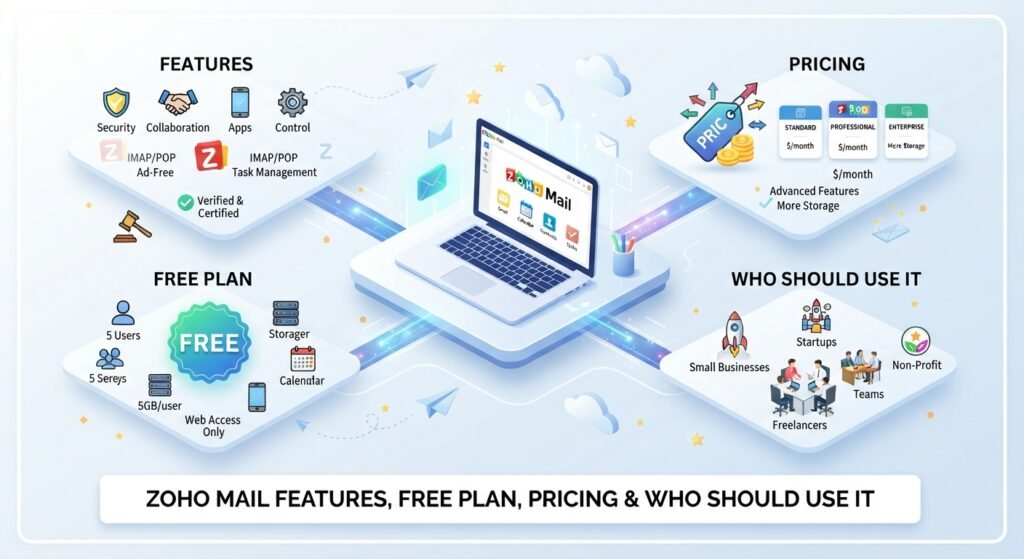
Zoho Mail is also ad-free. You will not see ads in your inbox.
Key Features of Zoho Mail
Here are the main features:
- Custom domain email: Use your own domain name for all your team emails.
- No ads: Your inbox stays clean and simple.
- Strong security: It has two-factor authentication, spam filters and encryption options.
- Calendar, contacts and tasks: Manage your daily work in one place.
- Shared inboxes and groups: Teams can work on emails together.
- Admin controls: Business owners can add users and manage settings.
- Mobile apps: Check your email on your phone at any time.
- Zoho app connection: It works well with Zoho CRM, Zoho Projects and other Zoho tools.
Is Zoho Mail Free?
Yes, Zoho Mail has a free plan. Reports say it can work for up to 5 users, and each user gets about 5 GB of storage. It is ad-free and can be used with a custom domain.
The free plan is good for very small teams and startups. But it has limits. You may get less storage and fewer features than paid plans. Plan details can change, so check the official Zoho website before you sign up.
Zoho Mail Pricing
Zoho Mail has a few paid plans. These are the approximate prices per user each month:
| Plan | Approx. Price | Best For |
| Free | $0 | Very small teams |
| Mail Lite | About $1 | Small teams that need basic business email |
| Mail Premium | About $4 | Teams that need more storage and extra tools |
| Workplace | About $3 to $7 | Teams that also want chat, files, and office apps |
Prices depend on the plan, billing type and country. Yearly billing is often cheaper. Please check the official website for the latest price.
Zoho Mail vs Gmail vs Outlook
| Feature | Zoho Mail | Gmail / Google Workspace | Outlook / Microsoft 365 |
| Free plan | Yes, with limits | Yes, for personal use | Yes, for personal use |
| Custom domain on free plan | Yes | No | No |
| Ads in inbox | No | Yes, on free Gmail | Yes, on free Outlook |
| Best for | Budget and privacy | Google apps users | Microsoft Office users |
| Price for business | Very low | Higher | Higher |
Gmail gives more free storage, and it is shared with Google Drive and Photos. But Zoho Mail is often cheaper for small business teams. If your team already uses Google or Microsoft apps, you may prefer those tools.
How to Set Up Zoho Mail with Your Own Domain
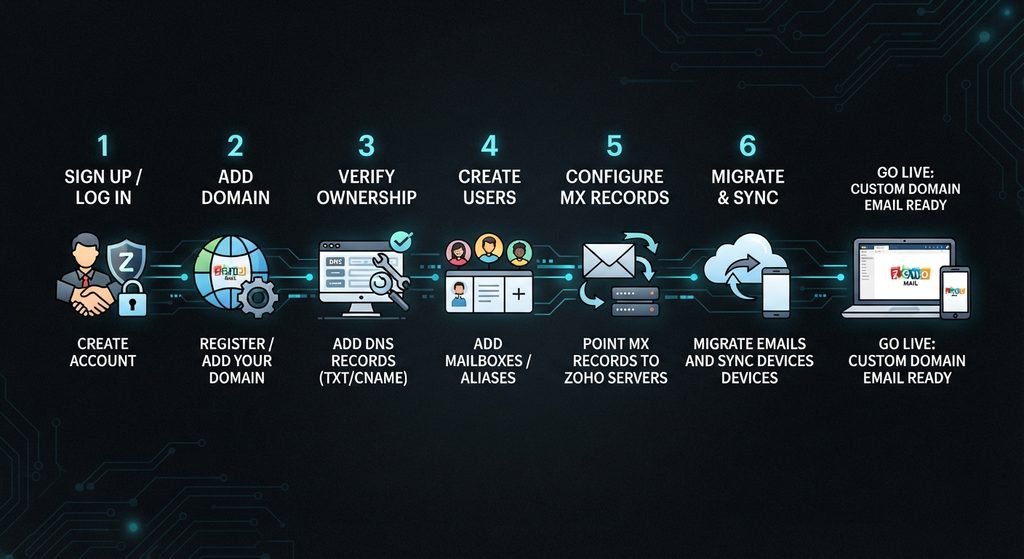
The steps are simple:
- Go to the Zoho Mail website and click Sign Up.
- Choose a plan. You can start with the free one.
- Enter your domain name.
- Prove that you own the domain. Zoho will guide you.
- Change your domain’s MX records in your domain settings.
- Create email accounts for your team.
If you feel stuck, Zoho has help guides. You can also ask your domain provider for help with MX records.
Pros and Cons of Zoho Mail
Pros
- Low price
- Free plan with custom domain
- No ads
- Good security options
- Works well with other Zoho apps
Cons
- Free plan has limited storage and features
- Fewer third-party app connections than Gmail or Outlook
- Some users report small delays in email syncing
- New users may need time to learn the settings
Who Should Use Zoho Mail?
Zoho Mail is a good choice if you:
- Run a small business or startup.
- Want a professional email address at a low cost.
- Like a clean, ad-free inbox.
- Already use Zoho CRM or other Zoho apps.
It may not be the best choice if your team depends on Google Docs or Microsoft Office every day.
Frequently Asked Questions
Is Zoho Mail free?
Yes. Zoho Mail has a free plan for a small number of users. It has limits on storage and features.
Is Zoho Mail better than Gmail?
It depends on your needs. Zoho Mail is cheaper for business teams and has no ads. Gmail has more free storage and works best with Google apps.
Can I use my own domain with Zoho Mail?
Yes. You can create email addresses with your own company domain.
Is Zoho Mail safe?
Zoho Mail offers two-factor authentication, spam filters and encryption options. You should also use a strong password and turn on 2FA.
How much does Zoho Mail cost?
Paid plans start at about $1 per user each month. Bigger plans cost more.
Conclusion
Zoho Mail is a simple, low-cost and ad-free email service. It is a smart choice for small businesses that want a professional email address without paying a lot. You can start with the free plan, test it with your team, and upgrade only when you need more.