
Look at any product in a shop. You will see a small box with black lines and numbers. That is an item barcode. The cashier scans it, and the price shows up in one second.
In this easy guide, you will learn what an item barcode is. You will also learn the types, how to get one, and how to use it in your business.
What Is an Item Barcode?
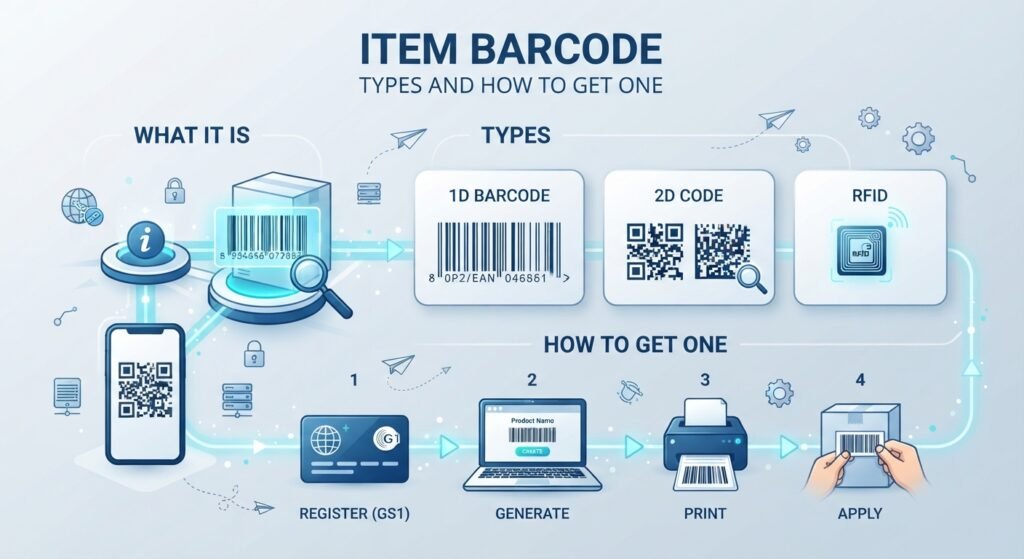
An item barcode is a code on a product. It is made of black lines and numbers. A scanner reads the lines. Then a computer shows the item’s details.
The lines are a way to write numbers that a machine can read fast. The numbers below the lines are for people to read.
How Does an Item Barcode Work?
It is simple:
- A scanner shines a light on the lines.
- The scanner reads the pattern.
- The pattern turns into a number.
- The computer finds that number in its list.
- The computer shows the item name, price and stock.
The barcode itself does not hold the price. It holds a number. The system then links that number to the item details.
Why Are Item Barcodes Important?
Item barcodes help in many ways:
- They save time. Scanning is faster than typing.
- They reduce mistakes. Machines do not make typing errors.
- They help track stock. You know what you have and what you sold.
- They speed up checkout. Shops serve more customers.
- They help online selling. Many marketplaces ask for a barcode number on each product.
Types of Item Barcodes
Here are the most common types:
- UPC: A 12-digit code. It is common in North America.
- EAN: A 13-digit code. It is common in most other countries.
- Code 128: Often used for shipping and warehouse labels.
- Code 39: Uses numbers, capital letters and some symbols. Often used inside businesses.
- QR code: A square code that can hold more data, like a web link.
| Type | Digits / Style | Common Use |
| UPC | 12 digits | Shops in North America |
| EAN | 13 digits | Shops in most other countries |
| Code 128 | Numbers and letters | Shipping and warehouses |
| Code 39 | Numbers, capital letters | Internal business use |
| QR code | Square pattern | Links and more data |
UPC vs EAN: What Is the Difference?
Both are made by the same global group, called GS1. The main difference is the length. UPC has 12 digits. EAN has 13 digits.
Both are types of a number called GTIN. GTIN means Global Trade Item Number. You can think of GTIN as the product’s official ID number. UPC and EAN are two ways to show that number as a barcode.
Today, most modern scanners can read both.
What Do the Numbers Mean?
A UPC barcode has three main parts:
- Company prefix: It shows which brand or maker owns the product.
- Item number: The company gives this to each product.
- Check digit: The last number. It helps the scanner catch mistakes.
Item Barcode vs SKU
People often mix these up.
- A barcode is a number in a format that machines can scan. Many shops and brands use the same system.
- A SKU is a code you make for your own stock. It is for your use only.
For example, your SKU may be “RED-SHIRT-M”. The barcode is the number that a scanner reads. One item can have both.
How to Get an Item Barcode for Your Product
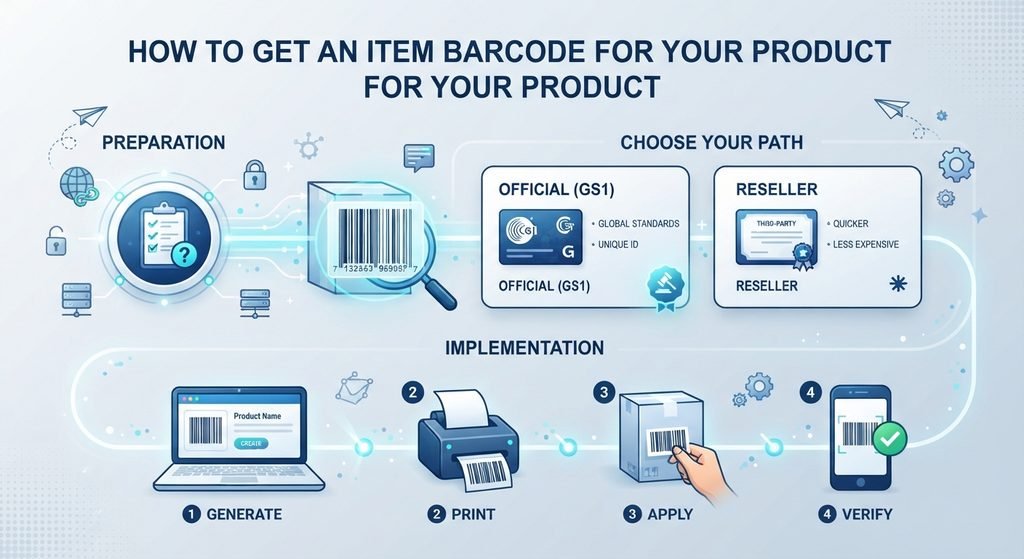
It depends on where you want to sell.
If you sell in shops or on big online sites:
You need an official barcode number. You cannot make up your own UPC. You must get it from GS1. You can apply on the GS1 website in your country. First, pick how many barcodes you need. Then you get a company prefix and assign a number to each product. The price and rules can differ by country, so check with your local GS1 office.
If you only need barcodes for your own stock:
You can create your own. Many inventory tools let you add your own barcode number to an item. You can also use a free barcode generator to make the label. Then print it and stick it on the item.
How to Add a Barcode to an Item in Software
Most inventory or sales software works like this:
- Open the item page.
- Find the barcode field.
- Scan the barcode or type the number.
- Save the item.
Now you can scan the barcode to find the item. Some software lets you add more than one barcode to the same item. Some also lets you use different barcodes for a single unit and a box.
Check that each barcode is unique. A barcode that is already used on another item may show an error.
Tips for Good Barcode Labels
- Print the barcode clear and sharp.
- Leave some white space around it.
- Do not stretch or squeeze it.
- Put it on a flat place on the item.
- Test the scan before you print many labels.
Common Mistakes to Avoid
- Using the same barcode on different items
- Using the same barcode on different sizes or colors. Each variant needs its own number.
- Making your own UPC to sell in stores. Stores may reject it.
- Printing low-quality labels
- Typing the number in the wrong field
Frequently Asked Questions
What is an item barcode?
It is a code of lines and numbers on a product. A scanner reads it to find the item in a system.
How do I get a barcode for my product?
For selling in stores or online, apply to GS1 in your country. For your own stock, you can create your own barcode with software.
Can I make my own barcode?
Yes, for inside use. But for selling in stores or on big sites, you need an official GS1 number.
What is the difference between UPC and EAN?
UPC has 12 digits and is common in North America. EAN has 13 digits and is used in most other places.
What is the difference between a barcode and a SKU?
A barcode is for scanners. A SKU is your own code to track stock.
Conclusion
An item barcode is a small tool with a big job. It saves time, cuts mistakes and helps you track stock. First, decide where you will sell. Then get an official barcode if you need one, or create your own for inside use. Start with a few items, test your labels, and grow step by step. A good item barcode setup can make your business faster and smoother.