


Does your sales team lose time looking for files? Do you send emails with many attachments? Do buyers ask the same questions again and again? A sales portal can help.
In this guide, you will learn what a sales portal is. You will also learn its features, its gains, and how to pick the right one.
What Is a Sales Portal?
A sales portal is a website or app. It keeps your sales items in one place. Think of it as a shared room. Your team and your buyers can go there to find what they need.
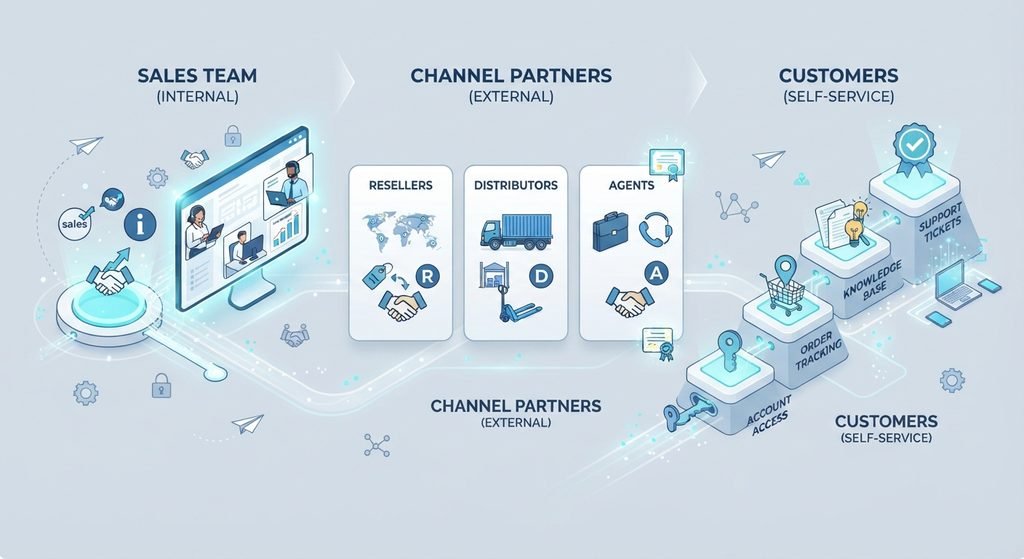
The words “sales portal” can mean a few things:
- A hub for your sales team. It has pitch decks, case studies, price lists and videos.
- A shared space with a buyer. You and the buyer share files, tasks and chat.
- An order site for customers or dealers. They see products and place orders.
All three have one goal. They make selling fast and easy.
How Does a Sales Portal Work?
It is simple:
- You add files and tools to the portal.
- Users log in with a safe account.
- Your team finds what they need fast.
- Buyers see the right facts at the right time.
- You see reports on what people use.
Main Features
- File library: Keep decks, brochures, videos and case studies. Find them with search.
- Safe file sharing: Share big files with no long email chains.
- Task lists: Show buyers the next steps.
- CRM link: Keep contact details fresh.
- E-sign: Sign deals online.
- Forms: Get answers from buyers.
- Live chat: Talk to clients in the portal.
- Reports: See what clients read.
- Your brand: Show your logo and colors.
- Online orders: Let customers order on their own.
Good Points of a Sales Portal
- It saves time. Your team stops searching for files.
- Everyone uses the same files. No old copies.
- Buyers get all facts in one place.
- It is better than email. No lost files.
- Teams work together. Buyers can share it with their team.
- You get data. You see what works.
Sales Portal vs CRM vs Email
| Tool | Main Job | Weak Point |
| Sales portal | Share files and tools with your team and buyers | Needs good setup |
| CRM | Keep customer data and track deals | Not made to share files with buyers |
| Send quick notes | Files get lost and threads get long |
A sales portal does not replace a CRM. They work best together.
Who Should Use a Sales Portal?
Use it if you:
- Have a sales team that needs many files.
- Sell to other businesses.
- Work with dealers or partners.
- Want customers to order online.
- Are tired of long email chains.
If your team is very small and your deals are simple, email and a CRM may be enough for now.
Why Some Sales Portals Fail
Some sales reps do not like portals. Here is why:
- The portal is slow.
- It is hard to use.
- The files are old or messy.
- Search does not work well.
- It adds more work.
- No one takes care of it.
A portal must help people. It should not be a chore.
How to Pick a Sales Portal
- Know your goal. Do you need a file hub, a buyer space or an order site?
- Check if it is easy. If it is hard, people will not use it.
- Test the search. People must find things fast.
- Check the links. It should work with your CRM.
- Check safety. You should control who sees what.
- Try it first. Ask for a demo or a free trial.
- Ask for the full price. Include setup and support.
How to Set Up a Sales Portal
- List the files your team uses most.
- Remove old files.
- Put files in clear groups.
- Add users. Choose who sees what.
- Link your CRM.
- Train your team for a short time.
- Ask for feedback. Fix problems fast.
Frequently Asked Questions
What is a sales portal?
It is a digital place with sales files and tools. Teams and buyers use it to work faster.
What is the difference between a sales portal and a CRM?
A CRM keeps customer data and tracks deals. A sales portal shares files and tools.
Who needs a sales portal?
Sales teams, business sellers, and firms with dealers or partners.
What features should it have?
A file library, safe sharing, good search, CRM link, reports and easy use.
Why do some sales portals fail?
They are hard to use, have old files, or have no one to take care of them.
Conclusion
A sales portal puts your files, tools and buyers in one place. It saves time and helps you close deals faster. Know your goal first. Pick a simple tool and test it with your team. Keep it clean and fresh. A good sales portal can make your sales work smooth and easy.